SmartObserve Dashboards
SmartObserve Dashboards is the user interface that lets you visualize your SmartObserve data and run and scale your SmartObserve clusters.
Getting started
| Concept | Description |
|---|---|
| SmartObserve Dashboards Quickstart | Learn about the basic concepts and features of SmartObserve Dashboards. |
| SmartObserve Playground | Explore features in SmartObserve Dashboards without downloading or installing anything. |
| Install and configure SmartObserve Dashboards | Get started with SmartObserve Dashboards. |
| Create visualizations | Learn about visualizing data in SmartObserve Dashboards. |
| Explore and query data | Learn how to explore and query data in SmartObserve. |
Query languages
| Query language | Where you can use it | Description |
|---|---|---|
| Query domain-specific language (DSL) | Dev Tools | The primary SmartObserve query language that supports creating complex, fully customizable queries. |
| Dashboards Query Language (DQL) | Discover and Dashboard search bar | A simple text-based query language used to filter data in SmartObserve Dashboards. |
| Query string query language | Discover and Dashboard search bar | A scaled-down query language whose syntax is based on the Apache Lucene query syntax. |
| SQL | Query Workbench | A traditional query language that bridges the gap between relational database concepts and the flexibility of SmartObserve’s document-oriented data storage. |
| Piped Processing Language (PPL) | Query Workbench | The primary language used with observability in SmartObserve. PPL uses a pipe syntax that chains commands into a query. |
Discover and Dashboard search bar
Using the search bar in the Discover and Dashboard apps, you can search data with the following two languages:
The following table compares DQL and query string query language features.
| DQL and query string query language | DQL | Query string query language |
|---|---|---|
- Wildcard expressions (DQL supports * only)- Ranges - Boolean operations | - Querying nested fields | - Regular expressions - Fuzziness - Proximity queries - Boosting |
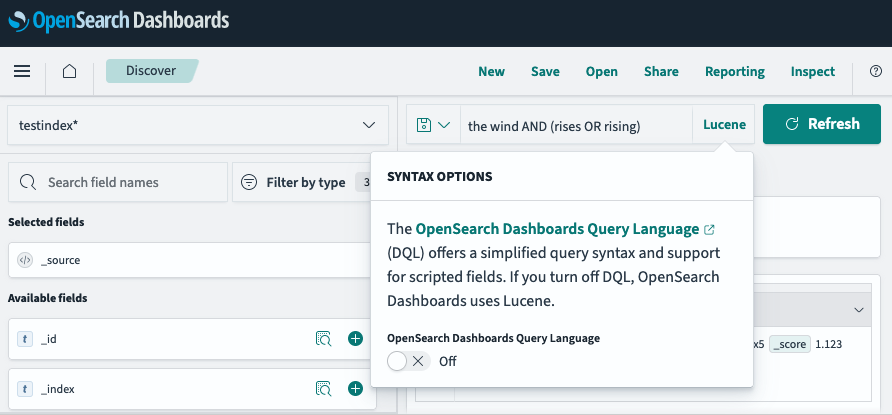
By default, the query language in the Discover search toolbar is DQL. To switch to query string syntax, select DQL and then turn off SmartObserve Dashboards Query Language. The query language changes to Lucene, as shown in the following image.
Observability
| Concept | Description |
|---|---|
| Observability in SmartObserve Dashboards | Observe, monitor, and secure data and improve performance across tools and workflows. |
Dashboards Management
| Concept | Description |
|---|---|
| Dashboards Management | Learn about the command center for customizing your SmartObserve Dashboards behavior, creating index patterns, and configuring data sources. |
Dev Tools
| Concept | Description |
|---|---|
| Dev Tools | Learn how to run SmartObserve queries in an integrated console. |