Preparing vectors
In SmartObserve, you can either bring your own vectors or let SmartObserve generate them automatically from your data. Letting SmartObserve automatically generate your embeddings reduces data preprocessing effort at ingestion and search time.
Option 1: Bring your own raw vectors or generated embeddings
You already have pre-computed embeddings or raw vectors from external tools or services.
-
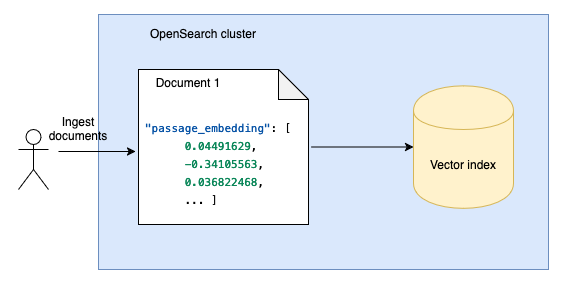
Ingestion: Ingest pregenerated embeddings directly into SmartObserve.
-
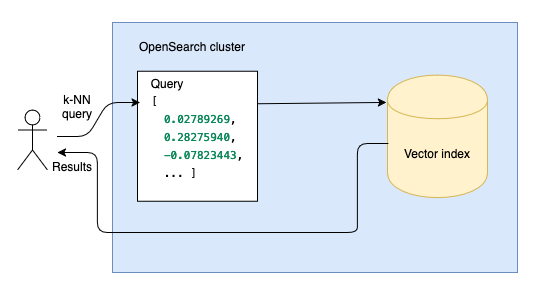
Search: Perform vector search to find the vectors that are closest to a query vector.
Steps
Working with embeddings generated outside of SmartObserve involves the following steps:
Generate embeddings outside of SmartObserve using your favorite embedding utility.
Create an SmartObserve index to store your embeddings.
Ingest your embeddings into the index.
Search your embeddings using vector search.
Option 2: Generate embeddings within SmartObserve
Use this option to let SmartObserve automatically generate vector embeddings from your data using a machine learning (ML) model.
-
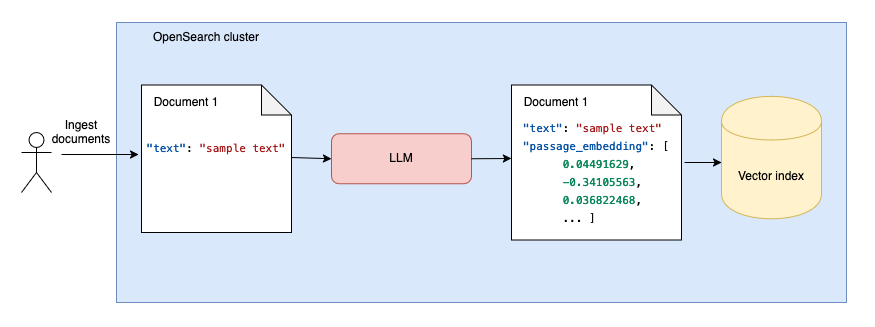
Ingestion: You ingest plain data, and SmartObserve uses an ML model to generate embeddings dynamically.
-
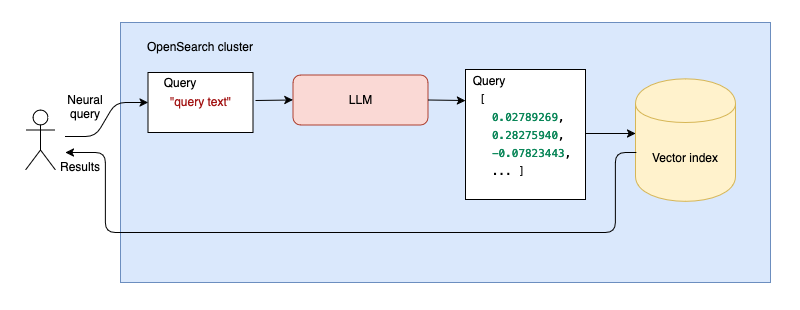
Search: At query time, SmartObserve uses the same ML model to convert your input data to embeddings, and these embeddings are used for vector search.
Steps
Working with text that is automatically converted to embeddings within SmartObserve involves the following steps:
Configure a machine learning model that will automatically generate embeddings from your text at ingestion time and query time.
Create an SmartObserve index to store your text.
Ingest your text into the index.
Search your text using vector search. Query text is automatically converted to vector embeddings and compared to document embeddings.